On the Books Report
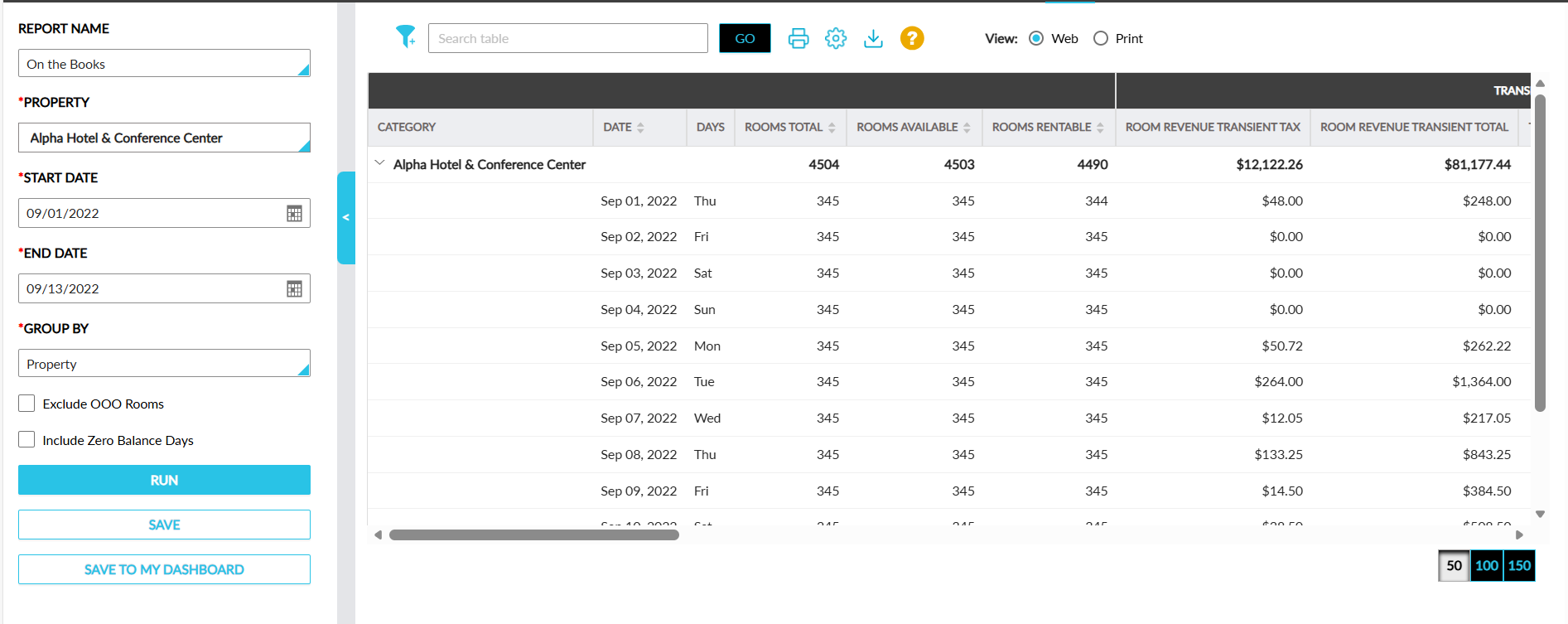
The On the Books report provides statistics on the rooms sold for transient and group bookings.
Perform the following steps to generate the report:
Navigate to Reports ➜ Dynamic Reports ➜ Revenue/Forecasting ➜ On the Books.
Refer to the following table and fill in the fields.
|
Field |
Description |
|---|---|
|
Report Name |
On the Books |
|
Property |
This is a mandatory multi-select drop-down list that allows users to select the properties for report generation. |
|
Start Date |
The start date for report generation. This is a mandatory field that displays the current property date by default. Users can select past, present, or future dates. |
|
End Date |
The end date for report generation. This is a mandatory field that displays the current property date by default. Users can select past, present, or future dates. |
|
Group By |
This is a mandatory single-select drop-down list that allows users to select from the following options:
|
Click Run to generate the report.
Click Save to save the report under User Favorites section.
Sample Report
Report Fields
This report displays the following fields:
|
Field |
Description |
|---|---|
|
Category |
Displays the Group By option selected with an accordion. When expanded, all reservations with the associated guest types are displayed. This column can be filtered. |
|
Date |
Each date in the selected date range. This column can be sorted. |
|
Days |
The day of the week. |
|
Rooms Total |
Total rooms in the property. This column can be sorted. |
|
Rooms Available |
Total rooms available for booking in the property. This column can be sorted. |
|
Rooms Rentable |
Total rentable rooms at the property. This column can be sorted. |
|
Transient |
|
|
Room Revenue Transient Tax |
Tax associated with room revenue for transient bookings. |
|
Room Revenue Transient Total |
Room revenue generated for transient bookings. |
|
Transient ADR |
ADR for transient bookings calculated as follows: Transient Revenue / Transient Rooms Sold. |
|
Rooms Sold |
Total count of rooms sold. This column can be sorted. |
|
Rooms Sold % |
Percentage of rooms sold. This column can be sorted. |
|
Revenue |
The revenue generated for the transient bookings. |
|
Group |
|
|
Revenue |
The revenue generated for group bookings. This column can be sorted. |
|
Picked Up |
The count of rooms picked up. This column can be sorted. |
|
Remaining |
Group rooms committed but not yet picked up. This column can be sorted. |
|
Room Revenue Group Tax |
The tax amount for the room revenue. |
|
Room Revenue Group Total |
The total room revenue generated for the group bookings including tax. |
|
Groups ADR |
ADR for group bookings. |
|
Rooms Sold |
Total count of rooms sold. This column can be sorted. |
|
Rooms Sold % |
Percentage of rooms sold. This column can be sorted. |
|
Property |
|
|
Rooms Sold |
Total count of rooms sold. This column can be sorted. |
|
OTM |
Off the Market rooms. This column can be sorted. |
|
OOO |
Out of Order rooms. This column can be sorted. |
|
Hold |
Rooms placed on hold. This column can be sorted. |
|
Departures Rooms |
Count of rooms with departing guests. This column can be sorted. |
|
Arrivals Rooms |
Count of rooms with arriving guests. This column can be sorted. |
|
Adults |
Total number of adults. This column can be sorted. |
|
Children |
Total number of children. This column can be sorted. |
|
Day Use |
Rooms booked for day use reservations. This column can be sorted. |
|
Comp Rooms |
Count of complimentary rooms. This column can be sorted. |
|
Redemption Stays |
Stays paid for using loyalty points/redemption. This column can be sorted. |
|
Rooms Occupied |
Count of rooms occupied. This column can be sorted. |
|
Occupancy |
The percentage of available rooms that are sold or occupied during a selected date range. This column can be sorted. |
|
Room Revenue |
The total room revenue generated. |
|
Room Revenue Tax |
The tax amount associated with the room revenue. |
|
Room Revenue Total |
The total gross room revenue. |
|
ADR Sold |
ADR for all sold rooms. This column can be sorted. |
|
ADR Occupied |
ADR for occupied rooms. This column can be sorted. |
|
Revpar |
Revenue Per Available Room. This column can be sorted. |
|
Available Rooms |
The available rooms in a property. |